# How to Read an SMM Panel Refill Policy Before You Order
Source: https://smmcollection.com/blog/how-to-read-an-smm-panel-refill-policy
Published: 2026-09-09 · Category: Guides · Reading time: 8 min
> Refill terms decide whether an order holds or quietly disappears. Five checks to run on a service page before you pay, and the wording to treat carefully.
*Sponsored article supplied by Boostero — the second of two in their sponsorship. The checklist below is the author's; we publish it as supplied because the standard it argues for is one any buyer can verify in ten seconds.*
Every panel mentions refills. Very few make the terms readable before you pay, and the gap between those two facts is where most complaints in this market begin.
A refill is simple in principle. Engagement drops over time, some of it within days. A refill service replaces what dropped, within a stated window, without a second charge. Whether that promise means anything depends entirely on details that are usually one click too far away.
Here is what to look for, in the order it matters.
## The five checks, in short
- **Per service, not sitewide** — refill terms come from the provider behind each service, so the number should change between services.
- **Before checkout, not after** — the window, order limits and start time belong on the order form itself.
- **Automatic beats ticket-based** — a refill you have to notice and claim quietly fails when you are not watching.
- **Read what counts as a drop** — a full-order refill and a below-baseline refill behave very differently.
- **Look for an honest "no refill"** — a catalogue where every service claims refill coverage is not labelling accurately.
New to the terminology? Our explainer on [what a refill guarantee actually covers](/blog/smm-panel-refill-guarantee-r30-lifetime-no-refill-explained) defines R30, R365 and "lifetime" first; this article is about auditing them before you pay.
## 1. Is the window on the service, or on the panel?
Panels often advertise a single refill period across the whole site. That is almost never how it works underneath. Refill terms come from the provider behind each service, and they differ service by service. One Instagram service may carry 30 days, another 365, a third none at all.
If a panel states one window sitewide and does not show a different figure on individual services, it is describing a policy rather than a term. Check whether the number changes when you open different services. **If it never changes, treat it as marketing.**
## 2. Can you see the terms before checkout, or only after?
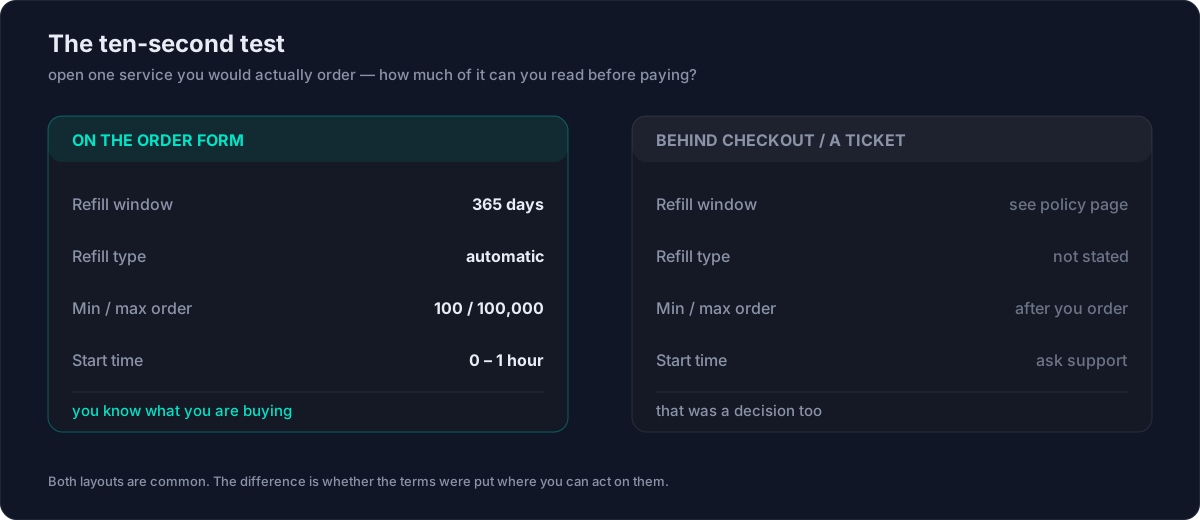
This is the practical test, and it takes ten seconds.
Open a service you would actually order. Before entering a link or adding funds, can you see the refill window, the minimum and maximum order size, and the expected start time? If those are on the order form, the panel has decided you should know what you are buying. If you have to place the order, open a ticket, or read a separate policy page to find them, that was also a decision.
 ## 3. Automatic, or ticket-based?
An automatic refill replaces drops without you doing anything. A ticket-based refill requires you to notice the drop, count it, and file a request inside the window.
Both can be honest. The difference is that ticket-based refills quietly fail when the buyer is not watching, which is most of the time. If a panel uses tickets, the window length matters much more, because a 30-day window you have to notice inside is worth less than a 365-day window that runs itself.
## 4. What counts as a drop?
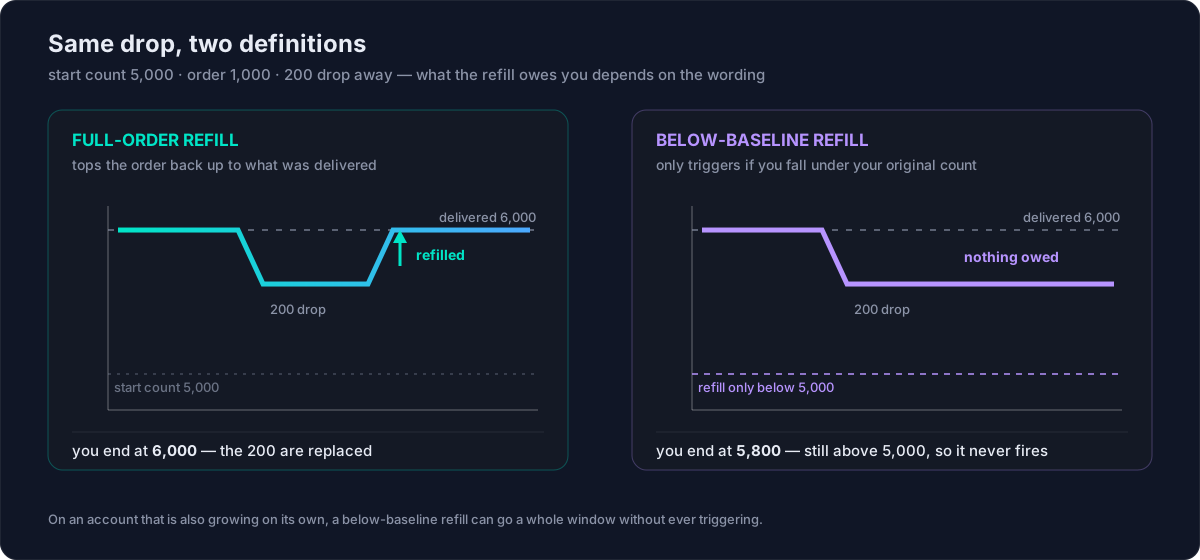
Read whether the refill covers the full order or only losses below the original count. These are not the same.
If you order 1,000 and 200 drop, a full-order refill takes you back to 1,000 delivered. A below-baseline refill may only trigger if you fall under where you started, which on a growing account can mean it never triggers at all.
## 3. Automatic, or ticket-based?
An automatic refill replaces drops without you doing anything. A ticket-based refill requires you to notice the drop, count it, and file a request inside the window.
Both can be honest. The difference is that ticket-based refills quietly fail when the buyer is not watching, which is most of the time. If a panel uses tickets, the window length matters much more, because a 30-day window you have to notice inside is worth less than a 365-day window that runs itself.
## 4. What counts as a drop?
Read whether the refill covers the full order or only losses below the original count. These are not the same.
If you order 1,000 and 200 drop, a full-order refill takes you back to 1,000 delivered. A below-baseline refill may only trigger if you fall under where you started, which on a growing account can mean it never triggers at all.
 ## 5. Does anything in the catalogue say "no refill"?
The clearest signal a panel is being straight with you is a service that states it has no refill.
Every catalogue contains services that cannot be refilled, usually because of how the provider delivers them. A panel that labels those honestly is telling you something useful. A panel where every single service claims refill coverage is either running an unusually uniform supply chain or is not labelling accurately.
## Wording worth treating carefully
Some phrasings appear often and mean less than they seem.
| Wording | What it actually commits to | What to ask |
|---|---|---|
| **"Refill guarantee"** with no window | Nothing enforceable — it is a word, not a term | What is the window, in days, on *this* service? |
| **"Non-drop"** | A description of expected behaviour: the provider has seen low drop rates | Is a refill window stated as well? |
| **"Lifetime refill"** | Usually the lifetime of the *listing*, not your account or the order | What happens to my refill if this service is retired? |
"Lifetime refill" is worth reading twice in particular. Lifetime of what: the order, the account, or the service listing? If a service is retired, a lifetime tied to the listing ends with it.
## The order to do this in
Before you place a first order on any panel, open one service and check five things: the refill window on that specific service, whether it is shown before checkout, whether it is automatic or ticket-based, what counts as a drop, and whether any services in the catalogue honestly say no refill.
That takes about two minutes and tells you more about how a panel operates than any review will. A panel that makes those five things easy to find has already answered the question you were going to ask support later.
One practical shortcut for the shortlisting stage: our [cross-panel service search](/services) shows which services their panels flag as refill-capable, alongside price per 1,000 and minimum order. That flag is a starting filter, not a term — the window length itself still lives on the panel's own service page, which is exactly where the five checks above belong.
## Frequently asked questions
### How do I check an SMM panel's refill policy before ordering?
Open one service you would actually buy and look for four things on the order form itself: the refill window in days, whether the refill is automatic or ticket-based, the minimum and maximum order size, and the expected start time. If they only appear on a separate policy page, treat the sitewide number as marketing.
### Does "non-drop" mean the same as a refill guarantee?
No. "Non-drop" describes expected behaviour — the provider has seen low drop rates on that service. It carries no obligation to replace anything. Only a stated refill window, on that specific service, commits the panel to restoring what dropped.
### What does "lifetime refill" actually cover?
Usually the lifetime of the service listing, not your account or your order. If the panel retires the service or changes provider, a lifetime tied to that listing ends with it. A dated window such as 365 days, from a panel with a track record, is often the firmer promise.
### Is an automatic refill better than a ticket-based one?
Both can be honest, but they fail differently. A ticket-based refill only works if you notice the drop, count it and file inside the window. An automatic refill runs whether or not you are watching, which is why window length matters far more when refills are ticket-based.
### Why would a service honestly say "no refill"?
Because of how the provider delivers it — some supply simply cannot be replaced. A catalogue that labels those services accurately is easier to trust than one where every single service claims refill coverage.
---
## About the author
Jack runs Boostero, an SMM panel operating since 2020. Refill terms, live rates, and minimum and maximum order sizes are shown on every service before checkout, which is the standard this article argues for.
## 5. Does anything in the catalogue say "no refill"?
The clearest signal a panel is being straight with you is a service that states it has no refill.
Every catalogue contains services that cannot be refilled, usually because of how the provider delivers them. A panel that labels those honestly is telling you something useful. A panel where every single service claims refill coverage is either running an unusually uniform supply chain or is not labelling accurately.
## Wording worth treating carefully
Some phrasings appear often and mean less than they seem.
| Wording | What it actually commits to | What to ask |
|---|---|---|
| **"Refill guarantee"** with no window | Nothing enforceable — it is a word, not a term | What is the window, in days, on *this* service? |
| **"Non-drop"** | A description of expected behaviour: the provider has seen low drop rates | Is a refill window stated as well? |
| **"Lifetime refill"** | Usually the lifetime of the *listing*, not your account or the order | What happens to my refill if this service is retired? |
"Lifetime refill" is worth reading twice in particular. Lifetime of what: the order, the account, or the service listing? If a service is retired, a lifetime tied to the listing ends with it.
## The order to do this in
Before you place a first order on any panel, open one service and check five things: the refill window on that specific service, whether it is shown before checkout, whether it is automatic or ticket-based, what counts as a drop, and whether any services in the catalogue honestly say no refill.
That takes about two minutes and tells you more about how a panel operates than any review will. A panel that makes those five things easy to find has already answered the question you were going to ask support later.
One practical shortcut for the shortlisting stage: our [cross-panel service search](/services) shows which services their panels flag as refill-capable, alongside price per 1,000 and minimum order. That flag is a starting filter, not a term — the window length itself still lives on the panel's own service page, which is exactly where the five checks above belong.
## Frequently asked questions
### How do I check an SMM panel's refill policy before ordering?
Open one service you would actually buy and look for four things on the order form itself: the refill window in days, whether the refill is automatic or ticket-based, the minimum and maximum order size, and the expected start time. If they only appear on a separate policy page, treat the sitewide number as marketing.
### Does "non-drop" mean the same as a refill guarantee?
No. "Non-drop" describes expected behaviour — the provider has seen low drop rates on that service. It carries no obligation to replace anything. Only a stated refill window, on that specific service, commits the panel to restoring what dropped.
### What does "lifetime refill" actually cover?
Usually the lifetime of the service listing, not your account or your order. If the panel retires the service or changes provider, a lifetime tied to that listing ends with it. A dated window such as 365 days, from a panel with a track record, is often the firmer promise.
### Is an automatic refill better than a ticket-based one?
Both can be honest, but they fail differently. A ticket-based refill only works if you notice the drop, count it and file inside the window. An automatic refill runs whether or not you are watching, which is why window length matters far more when refills are ticket-based.
### Why would a service honestly say "no refill"?
Because of how the provider delivers it — some supply simply cannot be replaced. A catalogue that labels those services accurately is easier to trust than one where every single service claims refill coverage.
---
## About the author
Jack runs Boostero, an SMM panel operating since 2020. Refill terms, live rates, and minimum and maximum order sizes are shown on every service before checkout, which is the standard this article argues for.